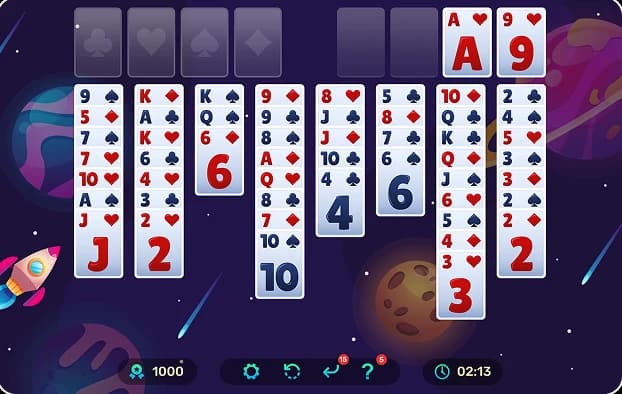
Why More People Are Switching From Offline FreeCell to Online Play


The FreeCell most of us grew up with lived on a Windows desktop, but today, more people open a browser tab instead. Something changed. The game itself is identical; what changed is the friction. Online play dropped the download, freed it from one PC, and added features the old version never had.
This guide covers the real reasons players are switching, an honest look at what (if anything) offline still does better, and how to start online in seconds, giving you a clear picture of how to play freecell online and helping you understand the shift from freecell offline to freecell online.
People are switching to online FreeCell because it removes the old friction. There's no download or install; it works on any device; it offers unlimited solver-checked deals, and it adds stats, hints, undo, and daily challenges the classic desktop version never had, all free. The game itself is unchanged.
Table of contents
FreeCell Offline vs Online FreeCell
| Feature | Offline (Desktop) FreeCell | Online FreeCell |
|---|---|---|
| Access | Install/built into old Windows | Open a browser tab, nothing to install |
| Devices | One PC | Phone, tablet, any browser |
| Deals | Fixed set (classic = 32,000) | Unlimited, refreshed daily |
| Winnability | Most deals solvable | Solver-checked, fair by design |
| Stats & tracking | Minimal / none | Wins, streaks, best times |
| Hints / undo | Limited | Built in |
| Updates | Frozen | Ongoing |
| Cost/ads | Free (older Windows) | Free; best sites run no ads |
Why Are People Switching From Offline to Online FreeCell?
Convenience is king: no installation is required, the game runs on any device, and it delivers unlimited fair deals with modern features without altering core gameplay.
As modern operating systems evolved, players began looking for ways to bypass local installation restrictions and hardware constraints, driving the massive wave toward browser-based card games.
No Download, No Install
The classic version meant installing software or being stuck on the one PC that had it. Online play opens in a browser instantly, acting as a major reason people made the jump, especially after newer versions of Windows dropped the built-in standalone game in favor of bundled packages. For anyone looking for a freecell no download experience, web platforms completely eliminate setup friction while keeping players engaged with top-tier freecell games for the brain.
Play on Any Device
A phone on the commute, a tablet on the couch, or a laptop at lunch means you can enjoy the exact same game, synced wherever you are. FreeCellClassic desktop FreeCell was permanently tied to a single machine, whereas modern mobile-responsive web design enables seamless access anywhere.
Unlimited Deals, and They’re Always Winnable
The classic Windows FreeCell shipped with a fixed collection of 32,000 numbered deals, out of which freecell game 11982 famously became known as the sole unsolvable puzzle. Transitioning to online platforms replaces these static configurations with endless, solver-verified hands, ensuring players avoid impossible boards unless intentionally selecting a more difficult challenge.
Features the Old Desktop Version Never Had
Modern web versions elevate the classic pastime by incorporating win/streak statistics, best-time tracking, hints, unlimited undo options, and daily challenges. These interactive features keep players engaged in ways that the frozen, minimalist desktop app from earlier Windows eras never could.
Is Anything Lost by Playing Online?
Offline play operates without internet access, and some nostalgic purists simply miss the classic Windows aesthetic. Addressing the common worry of whether online freecell is rigged: reputable sites deal randomly and run solver verifications, making online platforms just as fair, if not fairer, than the original. Many modern web versions also support Progressive Web App (PWA) offline capabilities where available, allowing you to easily practice your freecell strategy on the go.
How to Start Playing FreeCell Online
Getting started takes just a few seconds:
- Open your preferred browser platform.
- Click New Game to launch a fresh layout.
- Pick your preferred difficulty or mode and start moving cards.
Ready to dive in? Play FreeCell online free with no download and no sign-up required. For more guidance, check out how to play freecell and explore advanced strategy guides on freecell.game.
Frequently Asked Questions
- Yes, the core rules, card layouts, and mechanics remain entirely identical to the classic desktop versions, ensuring a familiar experience with added modern conveniences.
- No, online versions run directly inside your web browser, requiring zero downloads, installations, or local storage space.
- Most high-quality online FreeCell platforms are completely free to play, offering unlimited games without subscription fees.
- While classic versions require old desktop setups or specific app downloads, modern web platforms often support offline browser caching via Progressive Web App technology.
- Unlike the classic static 32,000 Windows deals, which contained rare exceptions like game #11982, modern online platforms utilize automated solvers to ensure random deals are practically winnable.
- Microsoft removed the classic standalone desktop versions starting with Windows 8, replacing them with the centralized Microsoft Solitaire Collection app.
FreeCell.game vs Other FreeCell Websites: Best Comparison
FreeCell.game vs other FreeCell websites compared by speed, ads, mobile support, solvers, and numbered deals. Discover the best FreeCell site online.

Card Games vs Board Games: Which Trains Your Brain Better ?
Discover whether card games or board games provide better brain training for memory, focus, strategy, and problem-solving.
Is FreeCell More Popular in the US or the UK? What the Data Says
Compare FreeCell popularity in the US and UK using search volume, per-capita data, and player interest.

Is Every Game of FreeCell Winnable? Strategy & Tips
Is every game of FreeCell winnable? Learn the truth behind FreeCell solvability, why most games can be won, and what makes some deals impossible.

How to Win FreeCell: Proven Tips to Beat Every Game
Learn how to win FreeCell with proven strategies, smart planning, and simple tactics that work on every deal. Improve your skills and start winning more games today!