How to Set Up FreeCell Solitaire (Step-by-Step)


FreeCell is a 52-card single-deck card game. Setting it up so there are no hidden surprises and all the cards are visible is the first step to playing it correctly.
The game is easier to understand, plan, and enjoy thanks to its clean layout. This guide will teach you the specific steps to install FreeCell so that you can Play FreeCell Online or offline without fear.
Table of contents
What You Need to Set Up FreeCell
You need to prepare a playing area prior to commencing. All of this is made possible by this simple move. Play with a complete 52-Deck of Cards, no jokers and no lost cards. All 52 cards will be used.
Prepare a flat surface, say a table or a desk, upon which there is a space at least eight columns in a row, and a little above these. This prevents time-wasting as cards do not slide, and you can see everything clearly.
Lastly, reserve a room of 8 tableau columns. These are the core areas where the majority of the game takes place, and marking them first will help you keep your layout organized.
Understanding the FreeCell Layout
After you have it ready, it is essential to be familiar with the three primary sections of the FreeCell setup. Being aware of what each part is can then help you understand the FreeCell Rules and strategy in the future.
The History of FreeCell explains how this structured layout became a standard format in modern gameplay.
The Tableau (8 Columns)
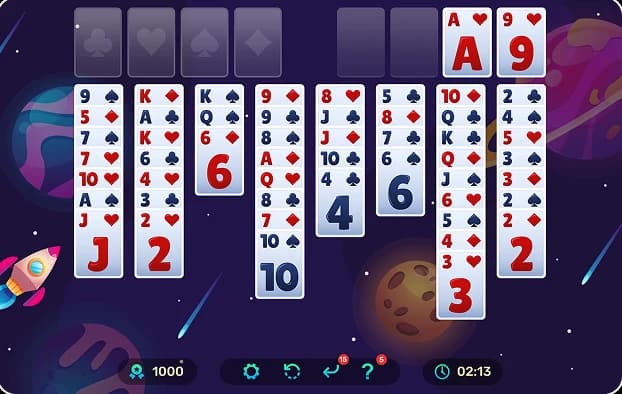
Lay out 8 piles in a row. Into these piles are delivered all the 52 cards, and upon them, similar to the way a house is built, is laid a lower card on a higher card of alternating colors, such as a black 7 upon a red 8. This is the row in which the greatest part of the action occurs.
The 4 Free Cells
The 4 Deck FreeCell Rules have 4 empty spaces above the left side of the tableau. These are the free cells. Each of them can hold a single card and begins with no card. Write notes on them to leave cards and come back later when you need to clear the way.
The 4 Foundation Piles
Above the right side of the tableau, leave 4 more spaces. These are the foundation piles, one for each suit. You build them from Ace up to King. Once all cards are moved here, the FreeCell game is won.
Step by Step: How to Set Up FreeCell with Cards
Now that you are familiar with the layout, we shall proceed to the process of playing FreeCell with a new deck that has just been shuffled.
Step 1 – Shuffle the Deck Thoroughly
Take your 52-card deck and shuffle it well. Aim for five to seven good shuffles. It is also necessary to shuffle the cards thoroughly, as this makes FreeCell interesting and fair by providing a random layout each time one plays. This is a rushed part by many new players, and part of what makes the game enjoyable is good randomness.
Step 2 – Deal 8 Tableau Columns
This is the most important part of the FreeCell solitaire setup.
Deal the cards like this:
- Start with the first column on the left.
- Deal one card face up into each column from left to right until all eight columns have one card.
- Then repeat the cycle, dealing one face-up card to each column again from left to right.
- Keep going until all 52 cards are dealt.
The correct distribution is:
- Column 1: 7 cards
- Column 2: 7 cards
- Column 3: 7 cards
- Column 4: 7 cards
- Column 5: 6 cards
- Column 6: 6 cards
- Column 7: 6 cards
- Column 8: 6 cards
Every card must be face up. There are no face-down cards in a proper FreeCell setup. Once you finish, you should see a full row of eight columns, each with a clear stack of face-up cards.
Step 3 – Leave Space for Free Cells
Above the left side of the tableau, leave 4 empty spots. These are free cells. Put no cards there during setup. They stay empty until you start playing.
Step 4 – Leave Space for Foundation Piles
Now look above the tableau on the right side and leave four more empty spots. These are the foundation piles. The columns, like the free cells, begin as empty ones. Play in this manner, first putting the Aces into their respective cells, and then proceed to fill them in the same suit, one after another; 2, 3, 4, etc., till you reach the King.
Common Mistakes When Setting Up FreeCell
Though there is a simple procedure for establishing the FreeCell card game, even minor misinterpretations may occur in the future. The following are some of the mistakes that should be avoided:
- Specifically, the number of cards per column was incorrect: all columns were assigned 7 cards each. Always remember the pattern 7-7-7-7-6-6-6-6.
- play cards down, which is the custom of other games such as Klondike. In FreeCell, every card must be face up.
- Forgetting to leave clear space for the four free cells and four foundation piles.
- Mixing up FreeCell with other solitaire setups that use fewer columns or uneven piles.
If your layout does not match the pattern above, it is worth picking up the cards and starting again. A correct setup makes the rest of the game smoother.
FreeCell vs Other Solitaire Setups
There are different types of solitaire games with a similar setup to FreeCell, and there are also other Types of FreeCell Games that are similar to it.
FreeCell vs Klondike
FreeCell deals all 52 cards face up into 8 columns. No hidden cards. Klondike uses 7 piles, with many cards starting face down. How to set up FreeCell solitaire keeps everything visible, so players focus on planning instead of luck.
FreeCell vs Eight Off
Both have reserve cells, but FreeCell uses 8 columns, 4 free cells, and 4 foundations with all cards face up. Eight Off tweaks the cell rules and the deal pattern. Stick to this exact FreeCell setup, and you're good.
Get how to set up FreeCell down pat, and you'll play sharper games every time. Practice a few setups, and it becomes second nature in under a minute.
FAQs
- You break all the 52 cards in a normal deck into the eight columns of the tableau. The initial four columns receive seven cards each, and the final four columns receive six cards each to complete a perfect, even layout.
- No, every single card goes face up during setup. This full visibility sets FreeCell apart and lets you plan moves right from the start.
- FreeCell always uses exactly eight tableau columns side by side. These columns form the main playing area where you build descending, alternating-color sequences.
- Free cells contain a single card as interim storage to help you move other cards. They open larger super moves by creating space on which to run with multiple cards.
- The building rules of FreeCell are more difficult to master initially, but the open layout and 99% solvable nature of the game make it easier to win once you have gotten used to it. Klondike is more of a luck game because of the concealed cards and a lower probability of winning, around 80-90%.

FreeCell.game vs Other FreeCell Websites: Best Comparison
FreeCell.game vs other FreeCell websites compared by speed, ads, mobile support, solvers, and numbered deals. Discover the best FreeCell site online.

Card Games vs Board Games: Which Trains Your Brain Better ?
Discover whether card games or board games provide better brain training for memory, focus, strategy, and problem-solving.

Why More People Are Switching From Offline FreeCell to Online Play
Find out why players are moving from classic desktop FreeCell to browser-based play and what online versions offer today.

Is FreeCell More Popular in the US or the UK? What the Data Says
Compare FreeCell popularity in the US and UK using search volume, per-capita data, and player interest.

Is Every Game of FreeCell Winnable? Strategy & Tips
Is every game of FreeCell winnable? Learn the truth behind FreeCell solvability, why most games can be won, and what makes some deals impossible.